
Buy Wingo Signals License: Complete Payment Guide
Wingo Team
May 25, 2026 · 10 min read
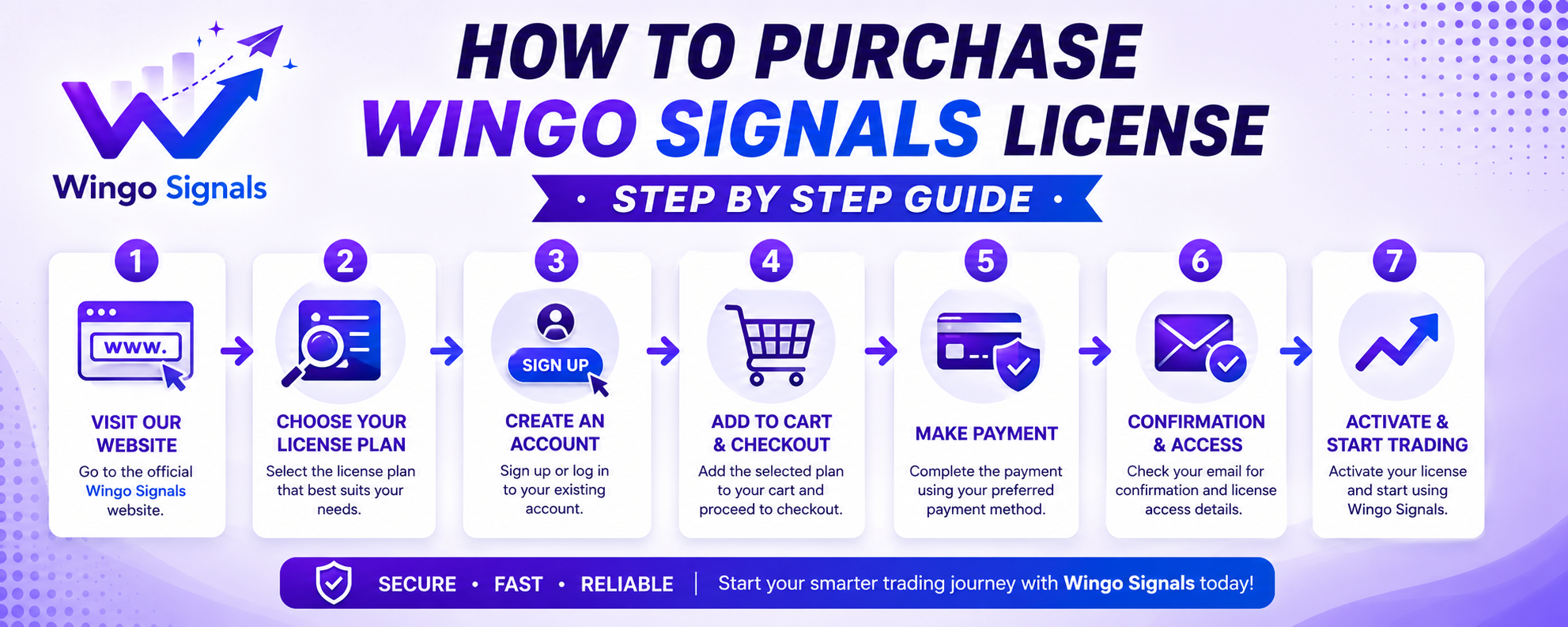
Buy Wingo Signals License: Complete Payment Guide for Beginners
Welcome to the complete guide for purchasing your Wingo Signals Premium License. If you want access to advanced Wingo predictions, AI-based analysis, higher accuracy, and priority support, choosing the right subscription plan is an important step.
This detailed payment guide explains everything you need to know, from selecting a plan to activating your account after payment. Whether you are a beginner or an experienced player, this article will help you complete the process quickly and securely.
Why Buy a Wingo Signals License?
Wingo Signals Premium is designed for users who want smarter predictions, better accuracy, and additional features that are not available in the free version. With premium access, members can receive AI-powered signals, market trend analysis, and faster updates.
Thousands of users prefer premium plans because they provide more powerful tools for making informed decisions while saving time and improving the overall experience.
Understanding Your Plan Options
Wingo Signals provides multiple subscription plans to suit different users and budgets. You can start with the free version or upgrade to Pro and Premium AI plans for advanced features.
| Plan | Price | Best For | Main Features |
|---|---|---|---|
| Free | ₹0 | New Users | Basic signals and limited features |
| Pro | ₹299/Month | Regular Players | Better accuracy, faster updates, premium support |
| Premium AI | ₹599/Month | Advanced Users | AI analysis, advanced signals, priority access |
Benefits of Wingo Signals Premium Membership
- Advanced AI-powered prediction system.
- Higher signal accuracy and improved analysis.
- Fast signal updates and premium support.
- Exclusive features unavailable in the free plan.
- User-friendly interface suitable for beginners.
- Secure and simple payment process.
- Regular improvements and feature updates.
Step 1: Choose Your Preferred Plan
The first step is selecting a suitable subscription package according to your requirements and budget.
Visit the pricing page available at /subscribe. Here, you will find detailed information about each plan along with pricing and features. Compare the available options carefully before proceeding.
If you are new, starting with the Pro plan is a good choice. Users looking for advanced AI-powered predictions can upgrade to the Premium AI plan for maximum benefits.
Step 2: Proceed to Payment
After selecting your preferred package, you will be redirected to the payment section. Wingo Signals supports secure UPI payments, making the transaction process fast and convenient.
You can pay using popular UPI applications such as:
- Google Pay
- PhonePe
- Paytm
- BHIM UPI
- Amazon Pay
- Any UPI-enabled banking application
Simply scan the provided QR code using your preferred application and complete the payment securely.
Step 3: Copy Your UTR Number
Once the payment is successful, your payment application will generate a unique transaction reference number known as the UTR number.
The UTR number acts as proof of payment and is required to activate your license. Make sure you copy the correct 12-digit UTR code to avoid verification issues.
Step 4: Activate Your Account
After copying the UTR number, return to the activation page and paste the transaction ID into the verification box.
Click the Submit & Activate button. Our system will verify the payment and activate your account accordingly.
Once verification is completed successfully, premium features will become available instantly or within a short period of time.
Pro vs Premium AI: Which Plan Should You Choose?
| Feature | Pro | Premium AI |
|---|---|---|
| Basic Signals | ✓ | ✓ |
| Advanced Analysis | ✓ | ✓ |
| AI Prediction System | ✗ | ✓ |
| Priority Support | ✓ | ✓ |
| Maximum Accuracy | Good | Best |
| Recommended For | Regular Users | Professional Users |
Tips Before Making Payment
- Ensure that you are scanning the official payment QR code.
- Double-check the amount before confirming the transaction.
- Save a screenshot of the payment receipt.
- Copy the correct UTR number.
- Use a stable internet connection while completing activation.
- Contact support if activation takes longer than expected.
Frequently Asked Questions
Is Wingo Signals safe to purchase?
Yes. The platform uses secure payment methods and simple account activation procedures for user convenience.
How long does activation take?
Most activations are completed quickly after successful payment verification. In some cases, it may take a few minutes.
Can I upgrade my plan later?
Yes. Users can upgrade from Free or Pro plans to Premium AI whenever they need additional features and advanced tools.
Which payment methods are supported?
All major UPI applications including Google Pay, PhonePe, Paytm, BHIM UPI, and supported banking apps are accepted.
What should I do if I entered the wrong UTR number?
Simply verify the transaction details from your payment application and submit the correct UTR number. If the issue persists, contact customer support for assistance.
Final Thoughts
Buying a Wingo Signals license is a straightforward process designed to help users unlock advanced prediction features and AI-powered analysis. By selecting the right plan, completing payment securely, and submitting your UTR number correctly, you can activate your premium membership without any difficulty.
Whether you choose the Pro plan or the Premium AI subscription, upgrading your account gives you access to better tools, faster updates, and a more powerful Wingo experience.
Related Articles
5 Proven Wingo Strategies for Beginners to Win
9 min read
Understanding Big and Small Rules in Wingo Games
8 min read
Wingo 30 Second Prediction Complete Mastery Guide
9 min read

Wingo AI Bot How It Works and Why It Beats Manual Prediction
10 min read